

Denny's Employee Healthcare Benefits and Compensation Guide

Your NEW Kerux125 Employee Health and Compensation Plan
Starts Here!

Before you begin...
The Denny's Kerux125 Plan is not just a new healthcare benefits plan that includes medical insurance benefits, it is also the nation's premier AI-driven wellness program that, by being enrolled, may have a positive impact on your take-home pay.
Yes, there is no plan like this. Kerux125 not only provides you with in-demand medical insurance benefits but that also uses tax savings (dollars you would otherwise pay to the government on your taxes) as a means to cover the plan costs, AND... all dollars left over go straight back into your paycheck (like a bonus for participating).
Medical + Wellness + More Pay!!


Healthcare Benefits Overview
Healthcare Benefit Highlights
Kerux125 offers an array of healthcare benefits designed to meet the diverse needs of all employees. Explore the many offerings and find the right solutions for you.
Download Your Summary of Benefits
Here
Plan Documents
Simple
Advantage
Complete
Now... let's get started!
Your employer is making these world-class benefits available to you because YOU MATTER!
Your employer DOES NOT want you to opt out of your new benefits and compensation plan, but by law, you do have 30 days prior to your benefits effective date to review all of your benefits and opt out. In order to opt out, you MUST speak with your enrollment team.
To speak with your enrollment team:
1-800-306-3112
8:00 AM –5:00 PM Central Time

Let's set up and activate your health and wellness benefits!
Personal Health Dashboard™ (PHD)
The Personal Health Dashboard™ (PHD) is the heart of your Kerux125 Complete experience. Built exclusively for you, it connects you to the full range of healthcare benefits, services, and support available through your plan — all in one easy-to-use dashboard.


Activate your Personal Health Dashboard
NOTE: Do not download the mobile app until you complete step one.
1. Log-on to: https://dennys.ushealthcenter.com/Activate
2. Select Activate by Demographics or Email.
3. Enter your personal information to create your account. You will receive your username.
REMEMBER THIS FOR FUTURE LOGINS!
4. Select Login and enter your password
5. Congratulations! Your PHD account is now activated and you are logged in.
Need help setting up your PHD or Reviewing your pay stub and benefits?
1-800-306-3112
8:00 AM – 5:00 PM Central Time, Monday - Friday
Don't forget...
to complete your confidential health risk assessment!
To get the most from your Kerux125 health plan, start by completing your Health Risk Assessment. This information helps your dedicated nurse/coach personalize your care and guide you to the benefits and resources that fit your needs best.

1. Click on 'Assessments' on your PHD homepage
2. Click on 'Health Risk Assessment'
The assessment usually takes 10-30 minutes to complete.
How to do a Paycheck Comparison
-
Log into your PHD
-
Click on the ‘Benefits’ link on the left panel of the homepage
-
On the Benefits Page, click on ‘Paycheck Comparison’
Payroll information shown is current as of your most recent paycheck and updates automatically each pay period.
Reading and Understanding Your Paystub
See your Employee Benefits Guide (EBG) for information on understanding how tax savings offsets all participation costs.
Medical Benefits
by
For a complete list of medical benefits provided to you at $0 net cost to you, please see the Summary of Benefits.
Activating & Registering For Your Medical and Insurance Benefits
1. Click on the 'Benefits' link on your PHD homepage and then click on the Verdegard link followed by selecting the link titled ‘Members’
-
Scroll down and click on the ‘Member Login’ link
-
First time login, click on the ‘Get Started’ link under ‘Register with us online’
OR
Register at: members.verdegard.com/register to set up your account
-
Download the app from the Apple Store or Google Play
-
Register your account using the email address linked to your member ID
-
Enter your existing password –and you’re in!
Search for a provider/doctor
-
On the https://verdegard.com website homepage, click on the ‘PROVIDER SEARCH’ tab
-
On the dropdown menu under ‘Choose a network’, select ‘Provider Network of America’, aka PNOA
-
Click on a green tab to define your provider/doctor search and fill in the information listed. If you do not currently have a doctor, click on the ‘location’ tab and complete the requested fields. A city locator tab will open and click on the city name. A list of providers/doctors with their specialty will open up. Select the doctor to contact.
Request ID Card, Helps, and FAQs
-
Need a replacement ID Card? Click on ‘Members’ tab and scroll down to the ‘Request ID Card’ link
-
Need to access your Virtual benefits or speak with a doctor virtually or access benefit information? Click on the ‘Member Login’ link
-
Need an Explanation of Benefits (EOB), Member Portal Reference Guide, Authorization Form, or other important information? The member page has you covered.
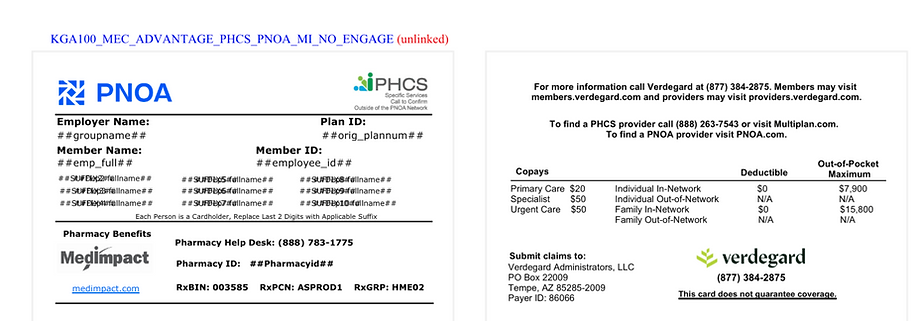
Sample ID Card
VERY IMPORTANT! If you are on the Kerux125 Advantage Plan, your medical benefits card can be used at any doctor’s office in the PNOA network.
If your doctor or medical facility has any issue accepting the card or information, have them immediately call the toll-free number listed on the card for verification.
What happens to my healthcare benefits if I am terminated?
Verdegard administers COBRA through a partner vendor, iSolved. Once Verdegard is notified of an employee's termination, that employee's information is sent to iSolved via a file feed. iSolved then issues the appropriate notice directly to the member. See a sample Qualifying Event Notice that employees receive when they become COBRA-eligible, as well as a sample General Notice that is sent once an employee’s coverage begins to inform them of iSolved.
Got Questions???
1-888-811-8944
https://verdegard.com/contact-us/
Activating Your Virtual Health and 24/7 Doctor Access
1. Go to: www.getlyric.com
-
Click on ‘Login’
-
First time logging in, click on the ‘Click here to Activate Your Account’ link or the green ‘Not Activated Yet? Activate Now’ tab.
-
Employee’s name should be already listed in the system and verified upon employee activation.
2. How to Use Your Lyric Virtual Urgent Care
24/7/365 access to care. Fast, Convenient & Affordable.
Doctors can be hard to reach, illness can occur in the middle of the night, and sometimes you just have a question. In all of those circumstances – and many more – Lyric Health is a convenient and affordable solution.

Simple as 1, 2, 3
1. Call | Tap | or Click Call
1.866.223.8831, download the Lyric Health App, or visit www.getlyric.com to log into your employee portal to schedule a consultation with state licensed physician.
II. Triage
Employee speaks to a Care Coordinator who will triage and update the employee’s Electronic Health Record (EHR).
III. Consult
Employee consults with Physician who recommends a treatment plan, and if medication(s) is prescribed, it’s sent electronically to the pharmacy of employee’s choice.
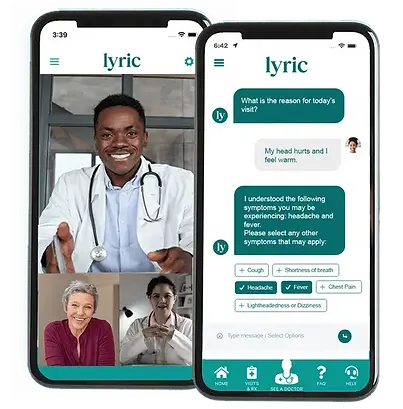
When to Use Your Lyric Virtual Benefits
Our goal is to provide you with convenient, affordable healthcare, when you need it most – 24/7/365.
-
When you need care NOW
-
If you have a health-related questions, and just need professional guidance
-
If you're considering the ER or urgent care center for a non-emergency issue • On vacation, a business trip, or away from home
Get virtual first care when you need it most!
Urgent Care
24/7 on-demand access to licensed physicians to help with non-emergency needs
Primary Care
Get ongoing, personalized care from a provider committed to your complete health
Mental Health
Visit with a caring mental health professional for depression, anxiety, or other concerns
Dermatology
Get a treatment plan for acne, eczema, or other conditions
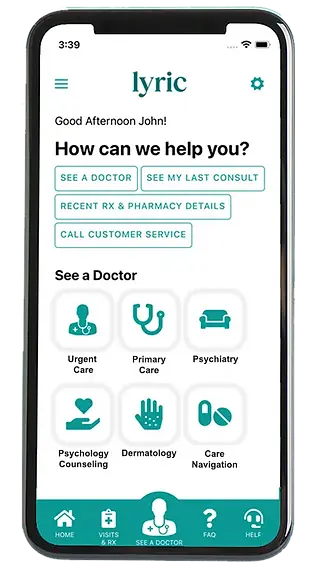
Care Navigation
Dedicated CARE team to guide members to their entire healthcare journey
Virtual MSK
Physical therapists deliver care plans proven to prevent injuries and guide members to pain relief
Labs
Leveraging data to determine potential risk factors in order to manage special conditions
GLP-1 Weight Loss Program
GLP-1 Weight Loss Medications Guided step therapy program for lasting weight loss
We highly encourage employees to utilize virtual healthcare services as the first point of care to maximize accessibility, efficiency, and cost savings. When additional or in-person care is necessary, employees should then utilize their medical and insurance benefits.
Need Help With Your Benefits?

Kerux125 Call Center
Call for questions related to:
-
Opting out of your health plan
-
Setting up and using your PHD
-
Paycheck comparison
1-800-306-3112
8:00 AM – 5:00 PM Central Time,
Monday - Friday
Medical Benefits by Verdegard
Call for questions related to:
-
Your medical/insurance benefits
-
Your medical/Insurance ID card
-
Insurance coverage questions
1-888-811-8944
https://verdegard.com/contact-us/
Virtual Health Benefits by Lyric
Call for questions related to:
-
Accessing a Virtual Direct Primary Care Physician
-
Accessing an Urgent Care Doctor 24/7
-
Accessing your virtual health benefits